Brother Pro Label Tool
4.1star
783 reviews
100K+
Downloads

Everyone
info

About this app
[Description]
Pro Label Tool is the successor to Mobile Cable Label Tool.
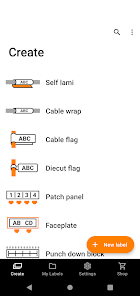
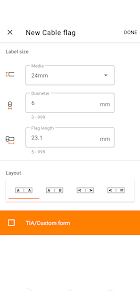
This is a free application designed to create labels for telecom, datacom and/or electrical identifications on demand. It enables you to easily print labels from your smartphone/tablet to a Brother label printer using a local wireless network.
[Key Features]
1. Automatic loading of pre-designed label templates from Brother's cloud server to keep them up to date.
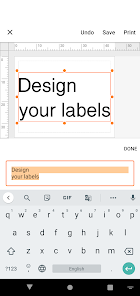
2. Easy to use - just a few taps to choose, edit and print professional quality labels.
3. No computer or printer driver required.
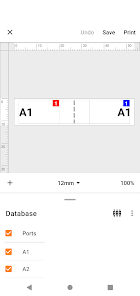
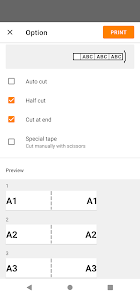
4. Powerful Print Preview
5. Enables you to work more efficiently by creating label designs with P-touch Editor at the office, then send them via email to others to print at the working site.
6. Connectable to CSV database
7. Serialize function frees you from duplicate typing when printing sequential labels with similar content on rows of ID labels.
8. Use the Custom Form function to create labels with standardised network address information.
[Compatible machines]
PT-E550W,PT-P750W, PT-P900W, PT-P950NW, PT-D800W, PT-E800W,PT-E850TKW, PT-E310BT,PT-E560BT, PT-E720BT, PT-E920BT
To help us improve the application, send your feedback to [email protected]. Please note that we may not be able to respond to individual emails.
Pro Label Tool is the successor to Mobile Cable Label Tool.
This is a free application designed to create labels for telecom, datacom and/or electrical identifications on demand. It enables you to easily print labels from your smartphone/tablet to a Brother label printer using a local wireless network.
[Key Features]
1. Automatic loading of pre-designed label templates from Brother's cloud server to keep them up to date.
2. Easy to use - just a few taps to choose, edit and print professional quality labels.
3. No computer or printer driver required.
4. Powerful Print Preview
5. Enables you to work more efficiently by creating label designs with P-touch Editor at the office, then send them via email to others to print at the working site.
6. Connectable to CSV database
7. Serialize function frees you from duplicate typing when printing sequential labels with similar content on rows of ID labels.
8. Use the Custom Form function to create labels with standardised network address information.
[Compatible machines]
PT-E550W,PT-P750W, PT-P900W, PT-P950NW, PT-D800W, PT-E800W,PT-E850TKW, PT-E310BT,PT-E560BT, PT-E720BT, PT-E920BT
To help us improve the application, send your feedback to [email protected]. Please note that we may not be able to respond to individual emails.
Updated on
Safety starts with understanding how developers collect and share your data. Data privacy and security practices may vary based on your use, region, and age. The developer provided this information and may update it over time.

No data shared with third parties
Learn more about how developers declare sharing

This app may collect these data types
App activity, App info and performance, and Device or other IDs

Data is encrypted in transit

You can request that data be deleted
Ratings and reviews
4.1
742 reviews

Nelson Oliveira
- Flag inappropriate
February 21, 2026
this app is a scam to force market segmentation on the same printers with different color plastic housing, it offers less options than the non pro version while having useful tools that could easily be in the non pro version given it looks to be the same code base
1 person found this review helpful
Brother Industries, Ltd.
February 23, 2026
Thanks for taking the time to review your experience with the Brother Pro Label Tool app. We appreciate your feedback. We would like to help. Please contact the Brother USA support team at www.brother-usa.com/support.

Dominic Rausch
- Flag inappropriate
January 8, 2026
Unfortunately the product managers of this app won't allow owners of the cheaper P-Touch Cube Plus to use this app. This is really inexplicable since I can use the desktop app to do all the things this app does with my Cube Plus. Brother, please allow me to use this app (or add similar functionality to the consumer app)
3 people found this review helpful
Brother Industries, Ltd.
January 13, 2026
Thanks for taking the time to review your experience with the Brother Pro Label Tool app. We appreciate your feedback and are working on improving the experience of each customer that uses our application. If you still need assistance, please contact the Brother USA support team at: https://www.brother-usa.com/support

William
- Flag inappropriate
October 10, 2023
The app is majorly frustrating. The distribution board function never seems to work for me. Despite measuring everything out the labels are still being printed out of line with the RCBOs. On top of that, the main switch isn't always left or right, it can be two in from left or right. There needs to be a way to make this movable, as it's frustrating too. The machine is an expensive top if the line machine,and the app doesn't meet its level.
9 people found this review helpful
What’s new
- Bug fixes
- Performance Improvements
App support
About the developer
BROTHER INDUSTRIES, LTD.
15-1, NAESHIROCHO, MIZUHO-KU
NAGOYA, 愛知県 467-0841
Japan
+81 52-824-2511


