
Widgets Watch Face
4.5star
235 reviews
10K+
Downloads

Everyone
info




About this app
Only for Wear OS devices - API 33+
Complications layout and digital clock combo was inspired by Quatro watch face design from VeshchiyOleg
Published with the permission from the original creator - [email protected]
Original creator's website: https://veshchiyoleg.com/quatro.php
Original creator's portfolio: https://apps.garmin.com/en-US/apps/a24870e3-b1ea-40a4-aea9-655cdf1d3ee2
Thanks Oleg!
Powered by Watch Face Format
amoledwatchfaces.com
BUY ONE GET ONE OFFER!
amoledwatchfaces.com/bogo
CUSTOM COMPLICATION APPS
amoledwatchfaces.com/apps
FEATURES
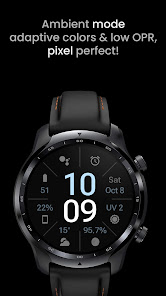
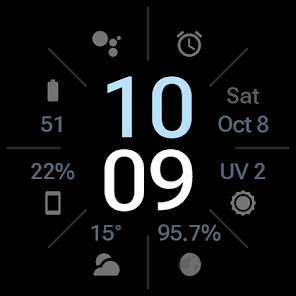
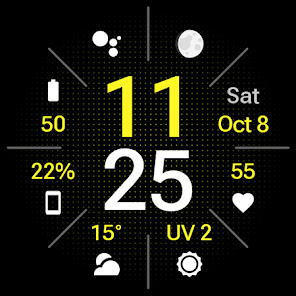
• 6x SHORT_TEXT complication
• 2x IMAGE complication
• true black background
• high resolution
• Roboto flex font
• PNGQuant optimized layers > battery friendly > low power consumption
USER CONFIGURATIONS
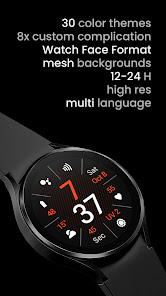
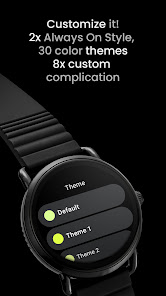
• Theme Color (30+)
• Time Color (30+)
• Mesh Backgrounds (5x + Disable)
• Digital Time (4x)
• AOD (2x)
• Custom complications (8x)
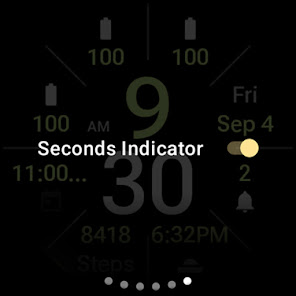
• Sec Indicator (Toggle)
• Alarm Shortcut (Toggle)
• Slot Separators (Toggle)
Installation and troubleshooting guide
amoledwatchfaces.com/guide
Please send any issues reports or help requests to our support address
[email protected]
Join our Telegram group for live support and discussion
t.me/amoledwatchfaces
Newsletter
amoledwatchfaces.com/contact#newsletter
amoledwatchfaces™ - Awf
Complications layout and digital clock combo was inspired by Quatro watch face design from VeshchiyOleg
Published with the permission from the original creator - [email protected]
Original creator's website: https://veshchiyoleg.com/quatro.php
Original creator's portfolio: https://apps.garmin.com/en-US/apps/a24870e3-b1ea-40a4-aea9-655cdf1d3ee2
Thanks Oleg!
Powered by Watch Face Format
amoledwatchfaces.com
BUY ONE GET ONE OFFER!
amoledwatchfaces.com/bogo
CUSTOM COMPLICATION APPS
amoledwatchfaces.com/apps
FEATURES
• 6x SHORT_TEXT complication
• 2x IMAGE complication
• true black background
• high resolution
• Roboto flex font
• PNGQuant optimized layers > battery friendly > low power consumption
USER CONFIGURATIONS
• Theme Color (30+)
• Time Color (30+)
• Mesh Backgrounds (5x + Disable)
• Digital Time (4x)
• AOD (2x)
• Custom complications (8x)
• Sec Indicator (Toggle)
• Alarm Shortcut (Toggle)
• Slot Separators (Toggle)
Installation and troubleshooting guide
amoledwatchfaces.com/guide
Please send any issues reports or help requests to our support address
[email protected]
Join our Telegram group for live support and discussion
t.me/amoledwatchfaces
Newsletter
amoledwatchfaces.com/contact#newsletter
amoledwatchfaces™ - Awf
Updated on
Safety starts with understanding how developers collect and share your data. Data privacy and security practices may vary based on your use, region, and age. The developer provided this information and may update it over time.

No data shared with third parties
Learn more about how developers declare sharing

No data collected
Learn more about how developers declare collection
Ratings and reviews
4.5
169 reviews

Sabina Jennings
- Flag inappropriate
August 16, 2023
Really wanted to love it; from the screenshots, it looked great, but on my new watch6, the heart rate doesn't work (it just shows the text heart rate, and I have to touch it to see it outside the watch face). Also, it has text for everything vs. images, as shown in the screenshots, so everything is cramped. "Steps," "Heart rate," my location spelled out, very disappointing. I wanted to purchase other faces, but now I'm hesitant.
1 person found this review helpful
amoledwatchfaces™
August 17, 2023
Hello, I'm sorry but this is how Samsung Health works on 3rd party watch faces. They only provide full complications on their own watch faces. This watch face only provides custom complication slots and it's about complication providers like Samsung Health to provide correct information for the user. Tomas | amoledwatchfaces.com

Larry Rosen
- Flag inappropriate
February 21, 2026
I always come back to this watch face. Best AOD, best complications (8). Most informative I’ve found.
amoledwatchfaces™
February 22, 2026
Thanks for your 5-star review!!!
Tomas | amoledwatchfaces.com

Mobilepreacher / Joe Davis
- Flag inappropriate
January 16, 2023
This is by far the best pixel watch face I have found in the Play store. I really love everything about it. Only a couple suggestions I wish every complication could be anything I want, some of them seem to be limited to just a few choices. Also I would love to have color schemes that are multicolored for the clock digits.
2 people found this review helpful
amoledwatchfaces™
January 16, 2023
Dear User, really appreciate your suggestion. We will consider it and improve our app in the new version. If you have questions or suggestions please contact us at [email protected].
What’s new
v1.2.0
• watch face now uses Google Sans Flex open source font (SEMI_BOLD)
• animated time-only AOD transition
• Text isAutoSize feature added in wff4 version
v1.1.9
• added RANGED_VALUE support
• RANGED_VALUE progress bars can be turned off
• updated complication layouts and defaults
• updated app icon
...
NOTE: Please consider full watch face reinstall in case you're having issues with custom complications after recent update.
• watch face now uses Google Sans Flex open source font (SEMI_BOLD)
• animated time-only AOD transition
• Text isAutoSize feature added in wff4 version
v1.1.9
• added RANGED_VALUE support
• RANGED_VALUE progress bars can be turned off
• updated complication layouts and defaults
• updated app icon
...
NOTE: Please consider full watch face reinstall in case you're having issues with custom complications after recent update.
App support
About the developer
Tomáš Marcinčin - amoledwatchfaces™
51 Nižný Kručov
09301 Nižný Kručov
Slovakia
+421 952 033 959


