Sectograph. Day & Time planner
Ilova ichida xaridlar
4,6star
99,1 ming ta sharh
5 mln+
Yuklanmalar

Hamma uchun
info


Bu ilova haqida
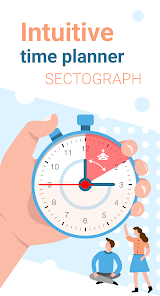
🎯 Sectograph is a new, intuitive way to view your calendar and daily schedule.
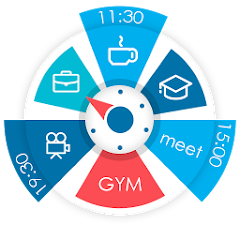
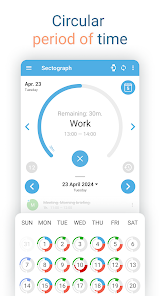
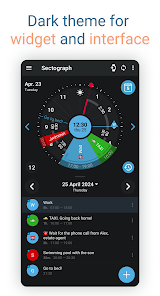
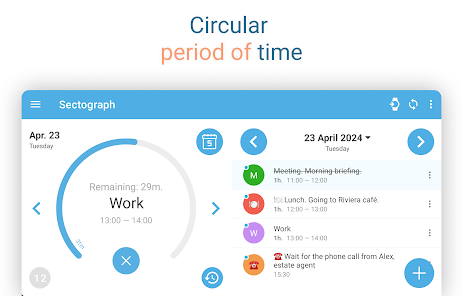
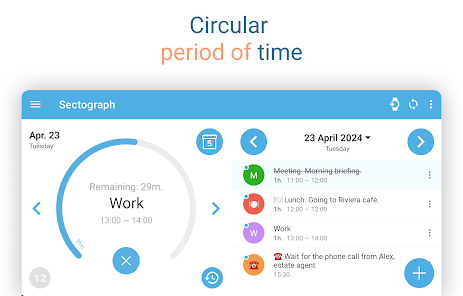
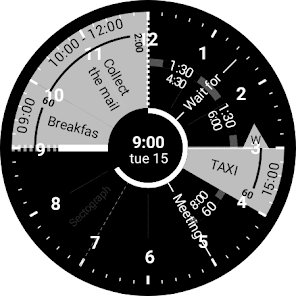
It shows your day as a circular planner — a 12-hour clock face — with events and free time between them.
A visual time planner for time blocking, time management, and a clearer sense of time.
⚙️ HOW IT WORKS
Sectograph is lightweight, privacy-friendly, and works with your existing calendars on the device.
It overlays your day planner (routine, local calendar, Google Calendar) onto a clock-face timeline and automatically calculates:
• upcoming events
• time blocks and durations
• gaps between events and your real free time
Everything updates as time passes, keeping your schedule always current.
Not a to-do list — it’s a calendar-based schedule planner that visualizes what’s already on your calendar.
👀 HOW IT LOOKS
Like an analog clock your brain already understands — but with your day mapped onto it as sectors.
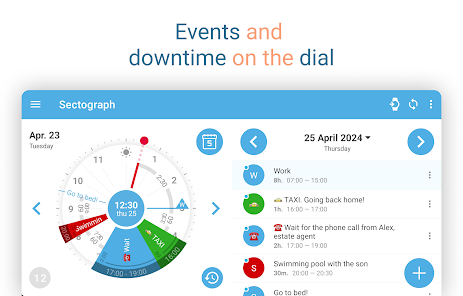
• Events appear exactly in the hours they happen (a radial / circular calendar view)
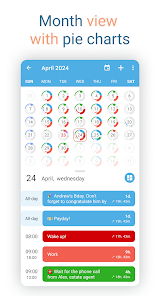
• Each sector width matches the event duration (a true pie-chart schedule)
• See gaps and the time from “now” to the next event at a glance
A clock planner / visual planner that helps you read your day instantly.
🎯 USE CASES & IDEAS
Use Sectograph as a day planner, daily planner, time planner, or routine planner for time management and daily schedule planning.
Great for time blocking (deep work, meetings, breaks), work/shift schedules, class schedules, travel itineraries, and Pomodoro planning (place focus sessions as time blocks).
If you like Chronodex, you’ll feel right at home.
🔄 SYNC & CALENDARS
Reads events from Google Calendar and your local device calendar; Microsoft Outlook calendar: beta.
📱 HOME SCREEN CALENDAR WIDGET
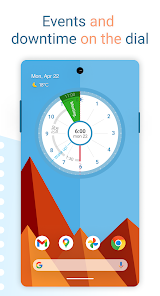
Keep your schedule always visible with a calendar widget / home screen widget.
• Automatic updates (including a clock refresh once a minute)
• Tap a sector to open details and quick actions
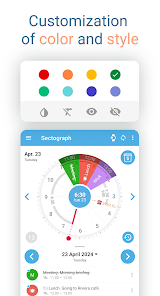
• Flexible visual settings + free widget themes: Dark / White / Gray
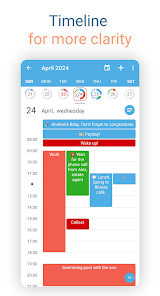
• Optional: light/dark app theme, 24-hour mode & extra zoom (1–12h), month/day grid views
⌚ WEAR OS (SMARTWATCH SUPPORT)
A true Wear OS calendar / smartwatch calendar at a glance:
• Watch app with an interactive widget
• Tile for quick access to the circular planner
• Watch face for continuous schedule awareness (installed separately)
• Large complication to enhance some third-party watch faces
🧠 HELPFUL FOR ADHD & “TIME BLINDNESS”
Designed to make time easier to grasp — especially if you struggle with time blindness, which is common for people with ADHD.
(Sectograph is not a medical app.)
✅ Install Sectograph and get a calm, visual overview of your day.
It shows your day as a circular planner — a 12-hour clock face — with events and free time between them.
A visual time planner for time blocking, time management, and a clearer sense of time.
⚙️ HOW IT WORKS
Sectograph is lightweight, privacy-friendly, and works with your existing calendars on the device.
It overlays your day planner (routine, local calendar, Google Calendar) onto a clock-face timeline and automatically calculates:
• upcoming events
• time blocks and durations
• gaps between events and your real free time
Everything updates as time passes, keeping your schedule always current.
Not a to-do list — it’s a calendar-based schedule planner that visualizes what’s already on your calendar.
👀 HOW IT LOOKS
Like an analog clock your brain already understands — but with your day mapped onto it as sectors.
• Events appear exactly in the hours they happen (a radial / circular calendar view)
• Each sector width matches the event duration (a true pie-chart schedule)
• See gaps and the time from “now” to the next event at a glance
A clock planner / visual planner that helps you read your day instantly.
🎯 USE CASES & IDEAS
Use Sectograph as a day planner, daily planner, time planner, or routine planner for time management and daily schedule planning.
Great for time blocking (deep work, meetings, breaks), work/shift schedules, class schedules, travel itineraries, and Pomodoro planning (place focus sessions as time blocks).
If you like Chronodex, you’ll feel right at home.
🔄 SYNC & CALENDARS
Reads events from Google Calendar and your local device calendar; Microsoft Outlook calendar: beta.
📱 HOME SCREEN CALENDAR WIDGET
Keep your schedule always visible with a calendar widget / home screen widget.
• Automatic updates (including a clock refresh once a minute)
• Tap a sector to open details and quick actions
• Flexible visual settings + free widget themes: Dark / White / Gray
• Optional: light/dark app theme, 24-hour mode & extra zoom (1–12h), month/day grid views
⌚ WEAR OS (SMARTWATCH SUPPORT)
A true Wear OS calendar / smartwatch calendar at a glance:
• Watch app with an interactive widget
• Tile for quick access to the circular planner
• Watch face for continuous schedule awareness (installed separately)
• Large complication to enhance some third-party watch faces
🧠 HELPFUL FOR ADHD & “TIME BLINDNESS”
Designed to make time easier to grasp — especially if you struggle with time blindness, which is common for people with ADHD.
(Sectograph is not a medical app.)
✅ Install Sectograph and get a calm, visual overview of your day.
Oxirgi yangilanish
Tanlangan hikoyalar

Xavfsizlik — dastur ishlab chiquvchilar maʼlumotlaringizni qanday jamlashi va ulashishini tushunishdan boshlanadi. Maʼlumotlar maxfiyligi va xavfsizlik amaliyotlari ilovadan foydalanish, hudud va yoshga qarab farq qilishi mumkin. Bu axborot dastur ishlab chiquvchi tomonidan taqdim etilgan va keyinchalik yangilanishi mumkin.


Reytinglar va sharhlar
4,6
95,1 ming ta sharh

Muslimbek Xurramov
- Nomaqbul deb belgilash
17-sentabr, 2025
aniq o'rnating va foydalaning

Rayhona Aminova
- Nomaqbul deb belgilash
6-avgust, 2025
ajoyib

Лобар Рустамова
- Nomaqbul deb belgilash
21-mart, 2025
It's perfect for reporting the day. But it would be nice to have a report showing how long it took to complete tasks.
Nima yangiliklar
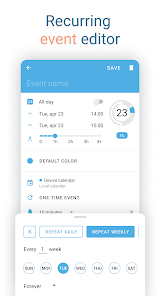
- Improved layout of the event editor and calendar view.
- Localization improvements.
- Better integration with the Wear OS watch face.
- The Wear OS watch face now always shows the correct time, regardless of power saving settings.
- Code optimization performed.
- Thank you for staying with us. More exciting things ahead ♡
- Localization improvements.
- Better integration with the Wear OS watch face.
- The Wear OS watch face now always shows the correct time, regardless of power saving settings.
- Code optimization performed.
- Thank you for staying with us. More exciting things ahead ♡
Ilova yuzasidan yordam
Dasturchi haqida


