
Musicolet Music Player
In-app purchases
4.7star
2.32L reviews
1Cr+
Downloads

Everyone
info
About this app
------------------------------------
PLEASE READ THIS BEFORE INSTALLING
1. This app can organise and play only the local audio files which are stored on the internal storage or SD card.
2. This app can not stream/download/search new music online.
------------------------------------
File formats supported:
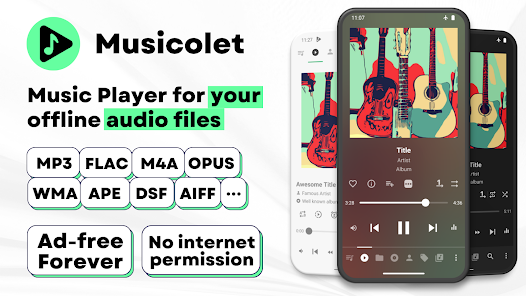
mp3, m4a, wma, flac, opus, aac, alac, ape, dsf and many more...
Features:
✅ Multiple Queues
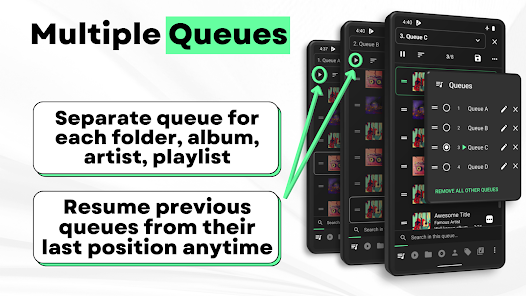
Separate queue for each folder, album, artist, playlist. Resume previous queues from their last position anytime.
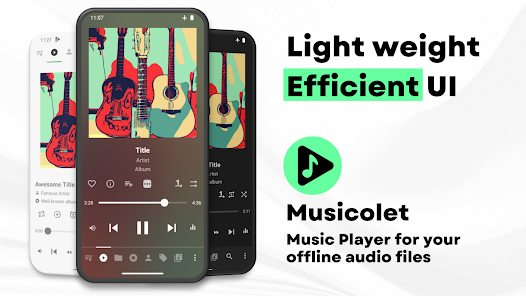
✅ Efficient UI, Easy navigation
For fast and easy navigation we placed all important components of the app (like Main player, Queues, Folders, Albums, Artists, Playlists) in just one row. So you can access them with just 1-Tap!
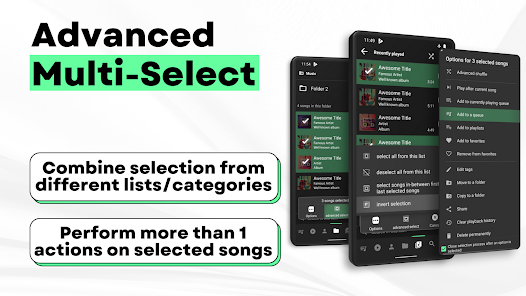
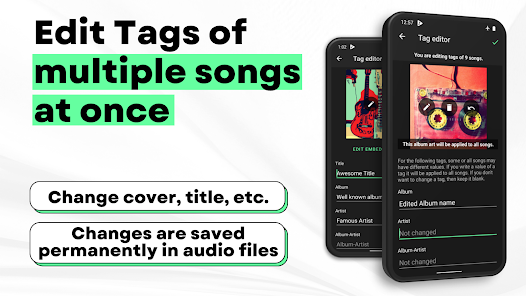
✅ Tag editor+: Can edit tags and album-arts of multiple songs at once.
✅ Move/Copy songs, Rename folders directly in app.
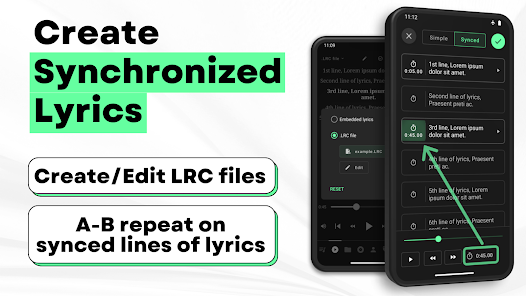
✅ Create Synchronized Lyrics.
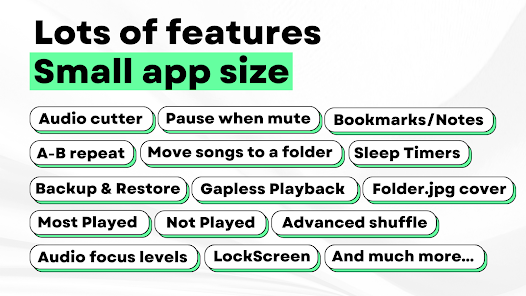
✅ Save Bookmarks and Notes.
✅ Add/remove a song to >1 playlist, from notifications, widgets and even from lockscreen
✅ Folder browsing 📁
2-types of folder structures: 1) Linear (all folders at once) and 2) Hierarchical(folders within folders)
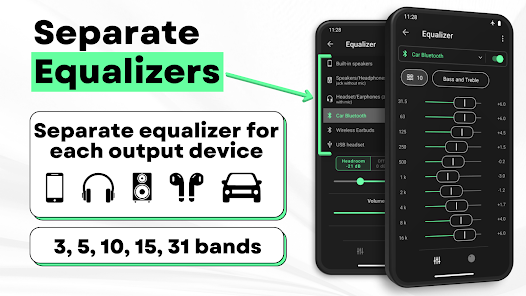
✅ Powerful Equalizer🎚🎚🎚: Separate presets and settings for Speakers🔊, Headphones🎧, Bluetooth etc.
✅ Gapless playback
✅ 🎧Earphone controls🎧
Single click for pause/play. Double click for next and Triple click for previous song. On each press >=4 you can Fast-Forward the song.
✅ Embedded Lyrics + LRC support
Supports offline lyrics embedded in audio file as ID3 tag. You can edit embedded lyrics from tag editor. Musicolet also support .lrc files for synced lyrics.
(Note: Musicolet doesn't fetch lyrics automatically from internet. You have to manually write or paste lyrics in tag editor, if there is no embedded lyrics. It doesn't fetch lrc file automatically. For lrc files, You have to find lrc file from internet, put it in the same folder and rename to exactly match it with audio file name manually.)
✅ Sleep timers
2 types: 1) close app after hh:mm time or 2) close app after N songs.
✅ Add shortcuts of any album/artist/folder/playlist to your HomeScreen (Launcher) app.
✅ Stunning Widgets
✅ Lock Screen (with controls, Queue and Lyrics)
✅ 🚘 Android Auto support 🚘
From your 'Android Auto' enabled car, you can control music and access your playlists, queues, folders and whole music library.
✅🎉Change notifications appearance🎉
✅ You can also enable Fast-Forward and rewind buttons in notifications from settings.
✅ Light and dark themes
✅ Backup and Restore
Automatic and Manual backups. Restore settings, playlists, play-counts from any backup anytime on any device.
And much more...
🚫No Ads🚫
Ad-free forever, for all users. 🤩
No internet permission, Completely offline
Musicolet doesn't even use Internet permission (a.k.a. network access permission). (You can check this in 'App permissions' at the bottom of this description in Play Store.)
Dedicated to Music lovers 🎶 all around the world. 🌎
Created with love ❤, lots of code and sleepless nights. Hope you will like our work.
------------------
Our official website: https://krosbits.in/musicolet
https://krosbits.in/musicolet/download
------------------
To send feedback/suggestions, report bugs or for other queries...
Contact us: [email protected]
PLEASE READ THIS BEFORE INSTALLING
1. This app can organise and play only the local audio files which are stored on the internal storage or SD card.
2. This app can not stream/download/search new music online.
------------------------------------
File formats supported:
mp3, m4a, wma, flac, opus, aac, alac, ape, dsf and many more...
Features:
✅ Multiple Queues
Separate queue for each folder, album, artist, playlist. Resume previous queues from their last position anytime.
✅ Efficient UI, Easy navigation
For fast and easy navigation we placed all important components of the app (like Main player, Queues, Folders, Albums, Artists, Playlists) in just one row. So you can access them with just 1-Tap!
✅ Tag editor+: Can edit tags and album-arts of multiple songs at once.
✅ Move/Copy songs, Rename folders directly in app.
✅ Create Synchronized Lyrics.
✅ Save Bookmarks and Notes.
✅ Add/remove a song to >1 playlist, from notifications, widgets and even from lockscreen
✅ Folder browsing 📁
2-types of folder structures: 1) Linear (all folders at once) and 2) Hierarchical(folders within folders)
✅ Powerful Equalizer🎚🎚🎚: Separate presets and settings for Speakers🔊, Headphones🎧, Bluetooth etc.
✅ Gapless playback
✅ 🎧Earphone controls🎧
Single click for pause/play. Double click for next and Triple click for previous song. On each press >=4 you can Fast-Forward the song.
✅ Embedded Lyrics + LRC support
Supports offline lyrics embedded in audio file as ID3 tag. You can edit embedded lyrics from tag editor. Musicolet also support .lrc files for synced lyrics.
(Note: Musicolet doesn't fetch lyrics automatically from internet. You have to manually write or paste lyrics in tag editor, if there is no embedded lyrics. It doesn't fetch lrc file automatically. For lrc files, You have to find lrc file from internet, put it in the same folder and rename to exactly match it with audio file name manually.)
✅ Sleep timers
2 types: 1) close app after hh:mm time or 2) close app after N songs.
✅ Add shortcuts of any album/artist/folder/playlist to your HomeScreen (Launcher) app.
✅ Stunning Widgets
✅ Lock Screen (with controls, Queue and Lyrics)
✅ 🚘 Android Auto support 🚘
From your 'Android Auto' enabled car, you can control music and access your playlists, queues, folders and whole music library.
✅🎉Change notifications appearance🎉
✅ You can also enable Fast-Forward and rewind buttons in notifications from settings.
✅ Light and dark themes
✅ Backup and Restore
Automatic and Manual backups. Restore settings, playlists, play-counts from any backup anytime on any device.
And much more...
🚫No Ads🚫
Ad-free forever, for all users. 🤩
No internet permission, Completely offline
Musicolet doesn't even use Internet permission (a.k.a. network access permission). (You can check this in 'App permissions' at the bottom of this description in Play Store.)
Dedicated to Music lovers 🎶 all around the world. 🌎
Created with love ❤, lots of code and sleepless nights. Hope you will like our work.
------------------
Our official website: https://krosbits.in/musicolet
https://krosbits.in/musicolet/download
------------------
To send feedback/suggestions, report bugs or for other queries...
Contact us: [email protected]
Updated on
Safety starts with understanding how developers collect and share your data. Data privacy and security practices may vary based on your use, region and age. The developer provided this information and may update it over time.

No data shared with third parties
Learn more about how developers declare sharing

No data collected
Learn more about how developers declare collection
Ratings and reviews
4.7
2.24L reviews

Filip Ivanis
- Flag inappropriate
25 June 2025
The one. After a grueling search and 30+ apps, I am happy to say that this one won with very little actual competition. Extremely powerful, customizable, but not bloated, and user-friendly. If I had to compare this to others I'd say that it has the flow and ease of use of Samsung music and other barebones built-in music players, while having the power of a full-blown desktop client akin to foobar2000, even exceeding it in some regards! Try it, spend 2 minutes in the settings, you'll love it!
197 people found this review helpful

A Google user
- Flag inappropriate
- Show review history
22 July 2025
This is a great app. No streaming, no sales pitches, no ads, no data mining. It plays the music that I put on my phone which is the music I want and love. I created a playlist with over 1,900 tracks. I love that it keeps track of where I was on each playlist. The interface was very easy to learn. I have upgraded to premium because I want to support the developer.
479 people found this review helpful

Ken Palar
- Flag inappropriate
13 March 2025
Beautiful and simple app, which does exactly what it says - allows you to listen the music files you own without any interuptions. The one thing that would be nice is a better artist view. I would rather have artist name with the album covers in a grid than the long text list, but it works; remembering what artist you were viewing when last using the app would also make it more user friendly. Otherwise, amazing player that anyone wanting to listen to their offline music library should install.
228 people found this review helpful
What's new
v 6.12.x:
✨ Optimizations and bug fixes.
——
👉 Read more in the App › Help and info › What's new.
✨ Optimizations and bug fixes.
——
👉 Read more in the App › Help and info › What's new.
App support
About the developer
KROSBITS
Plot No. 9, Behind Old Railway Station, Brahmin Society
Rajula
Amreli, Gujarat 365560
India
+91 94267 88429


